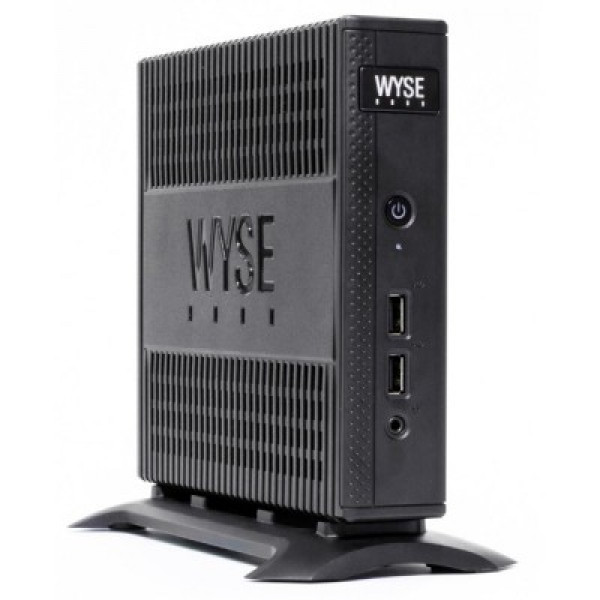
Dell Wyse for Linux: Affordable Thin Clients for Homelab and Home Servers
As interest in self-hosting, homelabs, and energy-efficient computing continues to grow, many technology enthusiasts are searching for affordable hardware that can run Linux reliably without consuming excessive power. One of the best-kept secrets in the homelab community is the Dell Wyse thin client.
Originally designed for virtual desktop infrastructure (VDI) environments, Dell Wyse devices are compact, quiet, and inexpensive computers that can often be purchased on the second-hand market for a fraction of the cost of a traditional desktop or server. Despite their small size, many Dell Wyse models are surprisingly capable of running modern Linux distributions and hosting a variety of self-hosted applications.
In this article, we’ll explore the advantages of using Dell Wyse devices with Linux, recommended models, hardware specifications, and the best use cases for home labs and home servers.
What Is a Dell Wyse Thin Client?
Dell Wyse thin clients are compact computers designed to connect users to remote desktops, virtual machines, or cloud-hosted applications.
Unlike traditional desktop computers, thin clients typically feature:
- Low power consumption
- Compact form factors
- Fanless designs
- Minimal noise
- Long hardware lifespan
Because they were built for enterprise environments, many Dell Wyse devices offer excellent reliability and are widely available in the refurbished market.
For Linux users, these devices provide an affordable platform for learning, experimentation, and self-hosting.
Why Use Dell Wyse with Linux?
1. Extremely Affordable
One of the primary reasons homelab enthusiasts choose Dell Wyse devices is their cost.
Popular models can often be found for:
- $30–$100 on the used market
- Less expensive than mini PCs
- Much cheaper than dedicated servers
This makes them ideal for beginners who want to build a Linux server without a large investment.
2. Low Power Consumption
Electricity costs are an important consideration for servers that run 24/7.
Many Dell Wyse devices consume:
- 5–15 watts when idle
- 10–25 watts under load
Compared to traditional desktop computers that may consume 80–200 watts, the savings can be substantial over time.
For users running home servers continuously, energy efficiency is a major advantage.
3. Silent Operation
Many Dell Wyse models feature fanless cooling systems.
Benefits include:
- Zero fan noise
- Reduced maintenance
- Less dust accumulation
- Quiet home office operation
This makes them perfect for apartments, bedrooms, and home offices.
4. Excellent Linux Compatibility
Most Dell Wyse thin clients use AMD or Intel x86 processors that are fully supported by Linux.
Popular distributions include:
- Ubuntu Server
- Debian
- Proxmox VE
- OpenMediaVault
- Alpine Linux
Installation is usually straightforward and similar to any standard PC.
5. Perfect for Learning Linux
Dell Wyse devices provide a low-risk environment for learning:
- Linux administration
- Networking
- Docker containers
- Web hosting
- Monitoring tools
- Automation scripts
Because the hardware is inexpensive, users can experiment freely without worrying about damaging expensive equipment.
Popular Dell Wyse Models for Linux
Dell Wyse 3040
The Dell Wyse 3040 is one of the most affordable thin clients available.
Typical specifications:
- Intel Atom x5-Z8350
- 2–8 GB RAM
- 8–16 GB flash storage
- Gigabit Ethernet
Ideal for:
- Pi-hole
- DNS servers
- Home Assistant
- Lightweight Linux labs
Dell Wyse 5070
The Dell Wyse 5070 is one of the most popular choices among homelab users.
Typical specifications:
- Intel Celeron J4105
- Upgradable RAM
- M.2 SSD support
- Gigabit Ethernet
Suitable for:
- Docker containers
- Media services
- Development environments
- Monitoring platforms
The Wyse 5070 offers one of the best price-to-performance ratios available in the used market.
Dell Wyse 5070 Extended
The extended version provides:
- PCIe expansion support
- Additional networking options
- Better scalability
This model is attractive for advanced homelab projects that require additional hardware.
Recommended Linux Operating Systems
Ubuntu Server
Ubuntu Server is often the easiest choice for beginners.
Advantages include:
- Extensive documentation
- Large community
- Docker support
- Long-term support releases
Debian
Debian is known for its stability and low resource usage.
It works exceptionally well on lower-end Wyse hardware.
Proxmox VE
Proxmox VE can transform a Dell Wyse into a virtualization host.
Benefits include:
- Virtual machines
- Linux containers
- Snapshot support
- Web-based management
The Wyse 5070 is particularly popular for Proxmox deployments.
OpenMediaVault
OpenMediaVault allows users to build an affordable NAS solution.
Features include:
- File sharing
- SMB and NFS support
- Backup services
- Storage management
Best Linux Projects for Dell Wyse
Pi-hole DNS Server
Pi-hole is one of the most common deployments.
Benefits include:
- Network-wide ad blocking
- Improved privacy
- Reduced bandwidth usage
Even the oldest Dell Wyse devices can run Pi-hole efficiently.
Home Assistant Server
Home Assistant turns a Dell Wyse into a smart home hub.
Users can control:
- Smart lights
- Sensors
- Cameras
- Automation routines
Docker Host
A Dell Wyse can host multiple Docker containers simultaneously.
Popular containers include:
- Jellyfin
- Grafana
- Vaultwarden
- Uptime Kuma
- Nextcloud
This makes the device a versatile self-hosting platform.
Monitoring Server
Users can deploy:
- Grafana
- Prometheus
These tools provide valuable insights into network and server performance.
Lightweight Web Server
Dell Wyse hardware is more than capable of hosting:
- Personal websites
- Blogs
- Development projects
- Internal applications
Linux web servers such as NGINX and Apache run efficiently even on older models.
Dell Wyse vs Raspberry Pi
Many users compare Dell Wyse devices with Raspberry Pi boards.
| Feature | Dell Wyse | Raspberry Pi |
|---|---|---|
| Price (Used) | Often Similar | Often Higher |
| x86 Compatibility | Yes | No |
| Linux Support | Excellent | Excellent |
| Docker Performance | Better | Good |
| Upgradeability | Better | Limited |
| Availability | High | Sometimes Limited |
For many homelab projects, a used Dell Wyse offers significantly better value than a new single-board computer.
Who Should Use Dell Wyse for Linux?
Dell Wyse devices are ideal for:
Beginners
Users learning Linux and self-hosting for the first time.
Homelab Enthusiasts
Individuals building affordable testing environments.
Developers
Those needing lightweight development and testing servers.
Network Administrators
Professionals creating monitoring and infrastructure services.
Home Automation Users
Anyone looking for a dedicated smart home server.
Dell Wyse thin clients have become one of the most popular hardware platforms for Linux-based homelabs and home servers. Their combination of low power consumption, silent operation, excellent Linux compatibility, and affordable pricing makes them an outstanding choice for beginners and experienced users alike.
Whether you’re running Docker containers, hosting a media server, learning Linux administration, deploying Home Assistant, or building a Proxmox cluster, a Dell Wyse device can provide impressive performance while consuming only a fraction of the power of a traditional desktop computer.
For anyone seeking an affordable entry point into self-hosting and homelab projects, a used Dell Wyse thin client is one of the smartest investments available today.