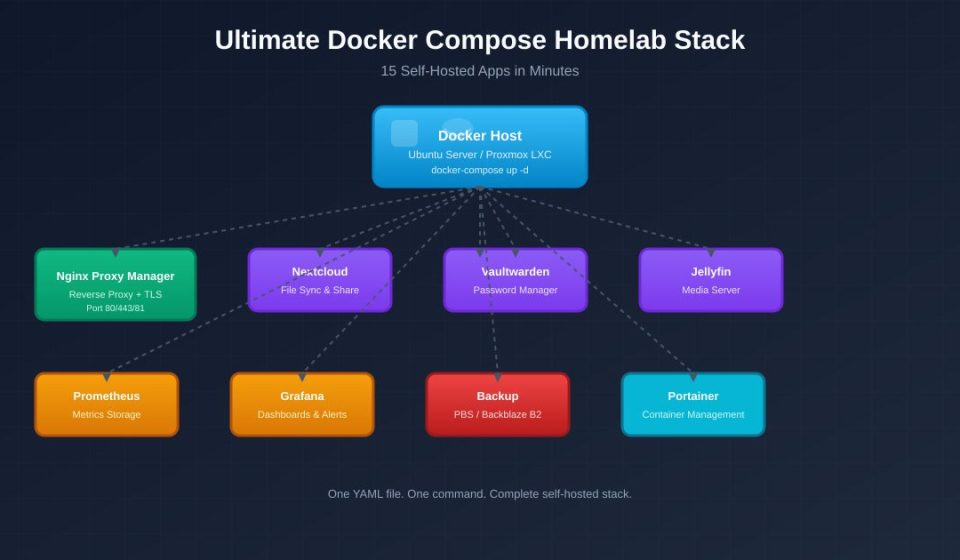

If you’ve ever wanted to deploy multiple self-hosted apps without fighting dependencies, Docker Compose is the answer. Instead of installing each service manually, you define your entire stack in one YAML file and bring it up with a single command.
Why Docker Compose for a Homelab
Most homelab guides scatter configuration across VMs, LXC containers, and bare-metal installs. Docker Compose changes that by packaging every service with its own isolated filesystem, network, and environment. You can deploy, update, and roll back entire stacks without touching the host OS.
The Starter Stack
Create a project directory and add a docker-compose.yml:
version: "3.9"

services:
  nginx-proxy-manager:
    image: jc21/nginx-proxy-manager:latest
    restart: unless-stopped
    ports:
      - "80:80"
      - "443:443"
      - "81:81"
    volumes:
      - ./npm/data:/data
      - ./npm/letsencrypt:/etc/letsencrypt

  nextcloud:
    image: nextcloud:latest
    restart: unless-stopped
    volumes:
      - ./nextcloud/html:/var/www/html
      - ./nextcloud/data:/var/www/html/data
    environment:
      - MYSQL_PASSWORD=***
This gives you a reverse proxy with automatic TLS and a file sync server in minutes.
Add Monitoring and Backup
Expand the same file with monitoring and backup services:
  prometheus:
    image: prom/prometheus:latest
    volumes:
      - ./prometheus:/etc/prometheus
    command:
      - "--config.file=/etc/prometheus/prometheus.yml"

  grafana:
    image: grafana/grafana:latest
    volumes:
      - grafana-data:/var/lib/grafana

  vaultwarden:
    image: vaultwarden/server:latest
    volumes:
      - ./vaultwarden:/data
Each service stays isolated, yet they communicate over a private Docker network.
Deploy and Manage
Start everything in detached mode:
docker compose up -dCheck status:
docker compose psUpdate a single service:
docker compose pull nextcloud
docker compose up -d nextcloud
If something breaks, roll back with Git or restore the previous Compose file.
Why This Works Better
Many beginners install services directly on a VM and later inherit dependency conflicts, port collisions, and broken upgrades. A Docker Compose stack keeps each app self-contained, simplifies backups, and makes migration to new hardware trivial — just copy the project folder.
Final Thoughts
Start small with a reverse proxy and one app, then expand into media servers, backups, and monitoring. Once your Docker Compose file is version-controlled, rebuilding your homelab after a disk failure becomes a matter of minutes instead of days.